Pick Screen Studio if you need captions, transcript editing or share links and don't mind $108 a year. Pick ScreenTell if you want the same polished look for free, with blur that follows sensitive info and a camera with background removal, and you mostly share files. Share links are coming soon.
Feature comparison
| ScreenTell | Screen Studio | |
|---|---|---|
| Price | App free; Share plan $4/month for hosted links (coming soon) | $108/year or $29/month |
| Free plan | Recording, editing and export | Opens, but exports need a paid plan |
| Platforms | macOS; Windows next | macOS only |
| Auto zoom on clicks, editable on the timeline | Yes | Yes |
| Manual zooms | Yes | Yes |
| Smooth cursor, cursor size, motion blur | Yes | Yes |
| Wallpapers, padding, corners, shadow | Yes | Yes |
| Camera: bubble, split, full camera | Yes | Yes |
| Camera background blur | Yes | — |
| Camera background removal | Yes | Cutout layout |
| Camera hides while you're quiet | Yes | — |
| Blur and highlight masks | Yes, with tracking | — |
| On-screen keystrokes | Yes, dark or light, with optional sounds | Yes |
| Speed up parts of a clip | Per clip, 1.5× to 8× | Yes |
| Aspect ratios | 16:9, 1:1, 9:16, screen | Multiple, switchable after recording |
| Export | MP4 720p–4K, 30/60 fps; GIF 480p/720p | MP4 and GIF |
| Captions | No | Yes |
| Transcript-based editing | No | Yes |
| Share links / cloud | Coming soon, with the Share plan at $4/month | Optional |
| Account | Only to share links | Licence |
Screen Studio details from Screen Studio's website and a Screen Studio pricing summary from Trainn. Checked 28 November 2026. A dash means we couldn't confirm it either way. Prices change, so check before you buy.
Recording
Both apps record a screen or a window with your camera and microphone, and both capture cursor and click data separately so the cursor can be smoothed and the zooms placed afterwards. ScreenTell starts from the menu bar, has a global shortcut and a floating pause and stop bar, and saves straight to ~/Movies/ScreenTell.
Editing
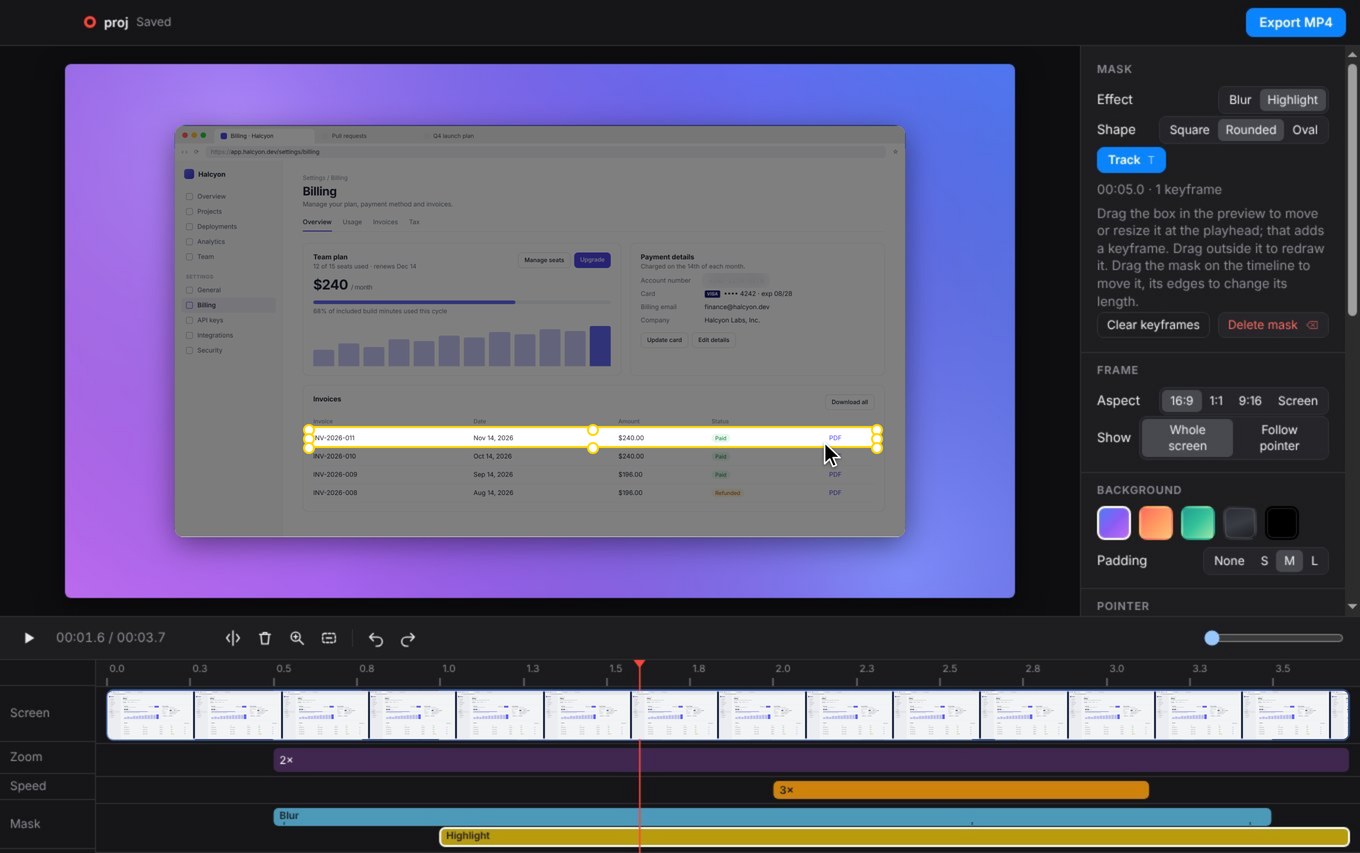
The editors feel alike: a preview on top, tracks below. ScreenTell's timeline has separate rows for zoom, speed, mask, camera and audio, so you can see at a glance where each effect starts and stops. The biggest difference is masks. In ScreenTell you draw a blur or highlight box and press Track, and it follows the content as the page scrolls, so you don't keyframe it by hand.
Camera
Both offer a bubble, split and full-camera layouts. ScreenTell adds background blur and background removal that run on your Mac, a light face touch-up, and a bubble that hides itself while you're not talking. Screen Studio offers a cutout layout.
Price
Screen Studio costs $9 a month billed yearly or $29 month to month, covers one person on up to three Macs, and no longer sells a lifetime licence. ScreenTell's app is free with no watermark. Hosted share links are coming with the Share plan at $4 a month, so you only pay if you share links.
The verdict
If captions or transcript editing are part of your weekly workflow, Screen Studio earns its price. If you record demos and tutorials, ScreenTell does the job for free, and it's the better pick when your recordings show customer data you need to hide.
Questions
Is ScreenTell a Screen Studio clone?
No. It's built for the same job, making screen recordings look edited, so the basics are alike. ScreenTell has its own editor and adds tracked masks, camera background removal, key sounds and saved looks.
Which one exports higher quality?
Both export sharp MP4 files. ScreenTell goes up to 4K at 60 fps.
Can I try both?
Yes. ScreenTell is free. Screen Studio opens without a licence, but you need a paid plan to export.