Short answer: the safest option is not to show real data at all. When you can't avoid it, blur it in an editor that tracks the blur to the text, so it stays put when the page scrolls or the video zooms in. A fixed blur box is the most common way secrets leak.
The mistake: a blur box that doesn't move
You record a settings page, draw a blur rectangle over the API key, and export. But halfway through you scrolled, and for 20 frames the key sat just below the box. Viewers can pause on any frame, and some will. Check every frame where the text is on screen, not just the first one.
1. Don't show it: use test data
A demo account with fake customers, a staging environment, or a browser extension that swaps in placeholder text removes the problem before you press record. It's the only option that is safe even if you forget to blur. Rotate any real key that appears on screen, blurred or not.
2. Blur it with tracking in ScreenTell
If the data has to be real, a tracked mask is the fastest fix. In ScreenTell:
- Move the playhead to the first frame where the text appears.
- Press + on the Mask row, drag a box over the text and choose Blur.
- Press Track. ScreenTell follows that part of the screen as you scroll and zoom.
- Scrub through the masked section. Drag the box on any frame that needs a nudge; that adds a keyframe.
- Trim the mask on the timeline so it covers the whole time the text is visible, with a few frames to spare at each end.
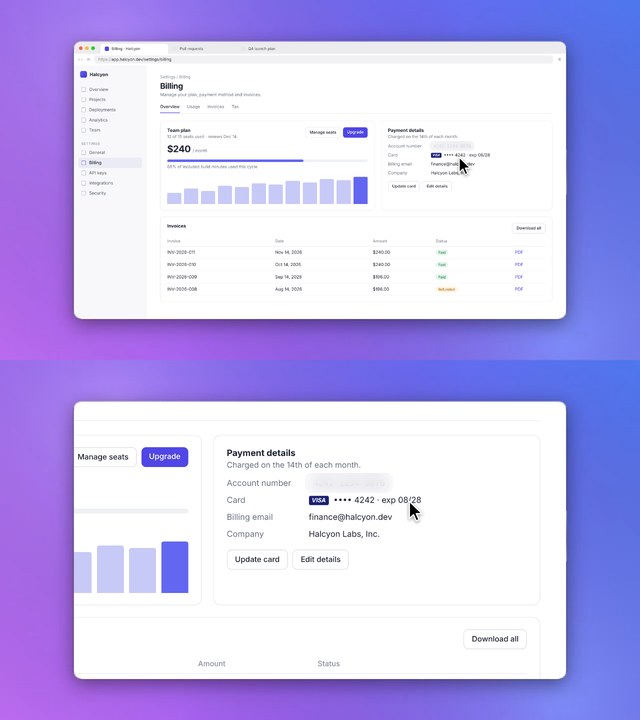
Because masks apply to the screen before zoom and styling, the blur stays on the text when an auto zoom pushes in.
3. Blur it in a video editor
Pro editors can do this with a tracked mask. In DaVinci Resolve you add a blur in the Color page, draw a window around the text and run the tracker. Final Cut Pro and Premiere Pro have similar masks with tracking. It works well, but takes a few minutes per mask and means another app in the workflow. iMovie can't blur part of the frame.
4. Crop or cut it out
If the sensitive area sits at the edge of the screen, record a single window instead of the whole display, or crop the export. If it appears for a moment, cut those seconds out.
Checklist before you share
- Scrub frame by frame through every section where private data is visible.
- Check the first and last frames of each mask, where leaks usually happen.
- Check notifications, browser tabs, bookmarks and autocomplete dropdowns. They show names and emails you didn't plan on.
- Rotate any secret that appeared on screen, even blurred.
Questions
Can a blur be reversed?
A blur burned into the exported video can't be removed as a layer, but a light blur over short text can sometimes be guessed. Use a strong blur, or a solid box for passwords and keys.
What's the difference between blur and pixelate?
Both hide detail. Strong blur looks cleaner in product videos; pixelation reads as “censored”. Either works if it's strong enough.