Short answer: for polished Mac recordings with auto zoom and no bill, ScreenTell is the free pick. Choose Screen Studio for captions and a mature paid app, Loom for quick messages sent as links, Cap for open source on Windows or Linux, Tella for AI editing in the cloud, and OBS for streaming and full control.
Price and platforms
| Price | Free to use? | Platforms | Where videos live | |
|---|---|---|---|---|
| ScreenTell | App free; Share plan $4/month for hosted links (coming soon) | Yes: record, edit and export with no watermark | macOS; Windows next | Your Mac |
| Screen Studio | $108/year or $29/month | No: exporting needs a paid plan | macOS only | Your Mac, optional cloud |
| Loom | Business $18, Business + AI $24 per user per month | Starter: 25 videos, 5 minutes each | Mac, Windows, Chrome, mobile | Loom's cloud |
| Cap | Desktop License $29/year or $58 once for commercial use; Pro $12 per user per month | Yes, for personal use | Mac, Windows, Linux | Your computer or Cap's cloud |
| Tella | Pro $16, Premium $24 per user per month | No: 7-day trial | Mac, Windows, Chrome | Tella's cloud |
| FocuSee | $19.99/month or $49.99/year for one computer; $199.99 once for five | Trial: one export, with a watermark | Mac, Windows | Your computer |
| OBS Studio | Free and open source | Yes | Mac, Windows, Linux | Your computer |
| Mac built-in (Screenshot app, QuickTime) | Free with macOS | Yes | macOS | Your Mac |
Sources: Screen Studio's website, a Screen Studio pricing summary from Trainn, Loom's pricing page, Cap's pricing page, Tella's pricing page, FocuSee's billing FAQ, the OBS Studio website. Prices in US dollars before tax. Checked 28 November 2026.
Features that make a recording look edited
| Auto zoom | Smooth cursor | Camera background removal | Blur that tracks content | Captions | Share links | |
|---|---|---|---|---|---|---|
| ScreenTell | Yes | Yes | Yes | Yes | No | $4/month plan, coming soon |
| Screen Studio | Yes | Yes | Cutout layout | — | Yes | Yes |
| Loom | — | — | — | — | Yes | Yes |
| Cap | — | — | — | — | — | Yes |
| Tella | Yes | Yes | — | — | Yes | Yes |
| FocuSee | Yes | Yes | Yes | — | AI, paid credits | Paid plans |
| OBS Studio | No | No | With plugins | No | With plugins | No |
| Mac built-in | No | No | No | No | No | No |
Checked 28 November 2026. A dash means we couldn't confirm it either way from the tool's own pages. Tell us if something has changed and we'll fix it.
Which one should you pick?
- Screen Studio if you want auto captions, transcript editing and share links today, and $108 a year is fine. ScreenTell vs Screen Studio.
- Loom if most of your videos are quick updates for teammates who will comment on them. ScreenTell vs Loom.
- Cap if you need Windows or Linux now, want open source, or want a link the moment you stop. ScreenTell vs Cap.
- Tella if you want AI to cut your video and host it on a page, and your team pays per seat. ScreenTell vs Tella.
- FocuSee if you want auto zoom on Windows as well as Mac and you're happy paying for it.
- OBS Studio if you stream, need scenes and many sources, and don't mind doing the zooms and polish yourself in another editor.
- The Mac's built-in recorder (press Shift-Command-5) for a quick raw capture with nothing to install.
- ScreenTell if you're on a Mac, want videos that look edited without editing, need to hide sensitive info as it moves, and want it all free and on your own machine.
What ScreenTell gives you for free
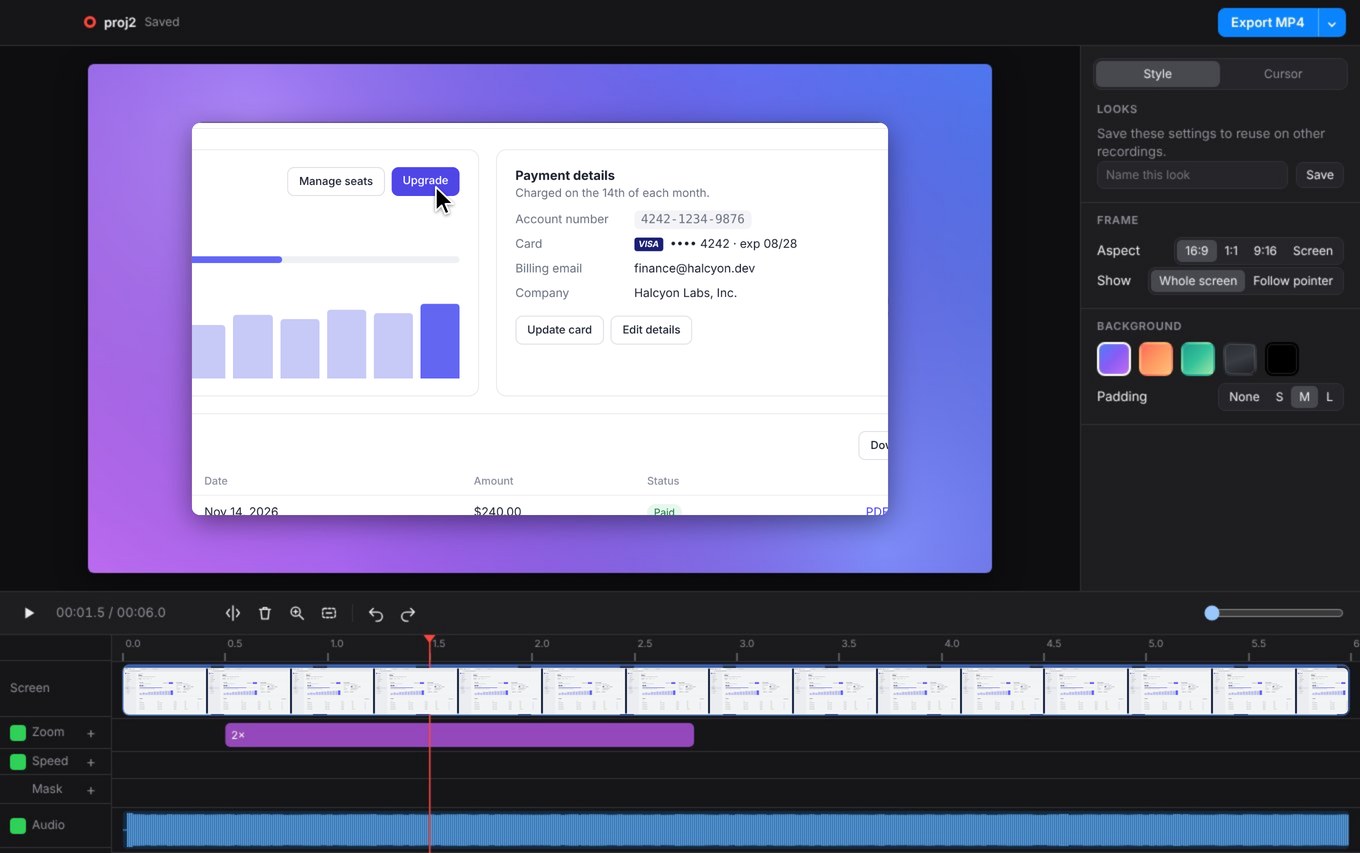
- Auto zoom. Zooms are placed where you click while you record, and you can move, resize or delete any of them on the timeline. How auto zoom works.
- A smooth, bigger cursor with optional motion blur on the cursor and on zoom pans.
- Backgrounds. Wallpapers, padding, rounded corners and shadow, saved as reusable looks.
- Camera. A bubble (circle, rounded or rectangle, in any corner), split screen or full camera, with face touch-up, background blur or removal, and a bubble that hides while you're quiet. Camera features.
- Tracked blur and highlight. Draw a box over an email or account number, press Track, and the blur follows it as the page scrolls. Blur and highlight.
- On-screen keys as dark or light keycaps, with optional key sounds. Keystroke display.
- Per-clip speed from 1.5× to 8× for the slow parts, camera included.
- Every shape and format. 16:9, 1:1 and 9:16 with follow-pointer cropping; MP4 at 720p, 1080p or 4K at 30 or 60 fps; GIF at 480p or 720p. Vertical video, GIF export.
- Private by default. No account to record, and nothing leaves your Mac unless you choose to share it. Recordings save to
~/Movies/ScreenTell.
Where ScreenTell is behind
ScreenTell doesn't make captions or let you edit by transcript, it's Mac-only until the Windows version ships, and hosted share links are still on the way. If any of those decide it for you, one of the tools above is the better pick for now.
Questions
What is the best free screen recorder for Mac?
For a raw capture, the Mac's built-in recorder (Shift-Command-5) is free and already installed. For recordings that look edited, with auto zoom, a smooth cursor, backgrounds and camera layouts, ScreenTell is free with no watermark and no account.
Which screen recorders zoom in automatically?
ScreenTell, Screen Studio, Tella and FocuSee all add zooms for you. OBS and the Mac's built-in recorder don't.
Is there a free alternative to Screen Studio?
Yes. ScreenTell gives you auto zoom, a smooth cursor, wallpapers and camera layouts for free on your Mac. Screen Studio is still ahead on captions and transcript editing.
Which screen recorder keeps my videos private?
Tools that record and edit locally, such as ScreenTell, Screen Studio, OBS and the Mac's built-in recorder, keep files on your computer. Loom and Tella upload recordings to their cloud. ScreenTell only uploads a video when you choose to share it.